Posts

Showing posts with the label Code Expo

ActionBar and Custom Action Bar

Android ActionBar is a menu bar that runs across the top of the activity screen in android. Android ActionBar can contain menu items which become visible when the user clicks the “menu” button.

WebView and Html - Handle HTML, CSS and Java Script

WebView is a complete simulation of web browser in Android View. If we want to load an HTML page in android application, WebView can do this for us. Note that HTML, CSS and Java Scripts is also supported. WebView is implemented as a subclass of View. Another limited version is also available in form Html class. We can parse HTML-formatted Strings in TextView using Html.fromHtml().

Picasso - An Android Library for Image caching, loading, resize & transform

Picasso is a library of SQUARE is used to thread and cache images asynchronously from server (Network), local storage (Disk or Memory) with some other cool functionalities like transform and resize of images. Normally, when we are working with images in mobile application, images loading is an pity issue. When application need to load many images at a time like in list-view or spinner, so due to huge load of it application may slow , crash due to not enough memory or scrolling issue than Picasso will help you a lot as well when you need to make a thumbnail of a heavy image.

Menus - Option Menu (Menu and App Bar)

Image
It is the basic structure of menu item for an activity.

Scrolling Activity - Activity Scroll

Image
The scrolling activity give a perfect and eye scathing view, in case when activity is long.

Simple and Custom Fonts

Image
A set of presentable(Displayable and Printable) text characters in a specific size and style is known as Font.  Typeface is the type design for a set of fonts, whereas Font Family formed from varieties of that design.

Text To Speech - Speak the text

Image
TextToSpeech library facilitate us to convert text in to voice in  a variety of languages. It have an  initListener, we must initialize the parameters of speaking like language setting etc. It have a variety of options like

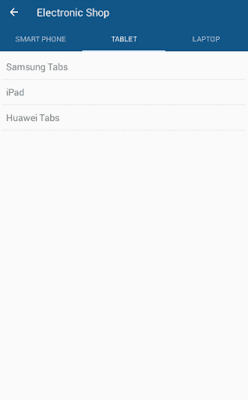
TabLayout and ViewPager

Image
Viewpager is used to slide/swipe through data in connection with fragments.

Custom ListView

Image
ListView is a type of user interface and a view group that provide a view of list with scroll able items.The list items are auto inserted to the list using an Adapter. Adapter is bridge that coordinate between code of different nature.Here it insert content from a Java source to XML source. Java source may be an array or database query and XML are ListView and Spinner etc.Adapter will pick data items from Java source and place it as XML Spinner or ListView contents.

Google Map API/Sdk for Android Application

Image
Google Map Server have an API or Maps SDK for Android applications. API includes add maps, map display, add markers, polylines, polygons based on Google Maps data to our application from Google Maps servers. It have a auto listener like map gestures (Zooming and Userview of Map) and two other listeners onMapReadyCallBack and onMapClickListener. We can customize the basic map user's view of a particular map area.

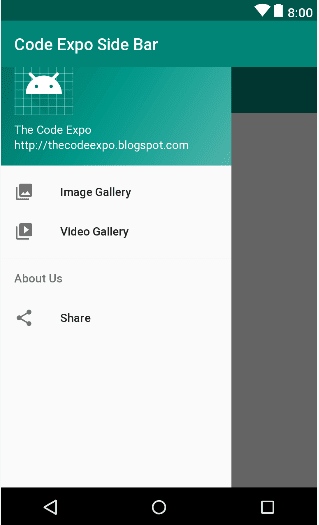
Side Bar - Navigation Drawer

Image
Used to penalize the top level menu of application.

Bottom Navigation Bar - Tabs

Image
Bottom Navigation Tabs is Bottom Tier/Layer of tabs, to perform some function when user click this tabs. It consists of three to five tabs. Normally we load fragment on tap of this tab. Tabs is designed with icon and its name in text.

Instant Run in Android Studio

Image
Previously we discussed,  How to Run Android Application?  Here we will discuss the Android Studio instant run feature.

Make a Phone Call & Dial Number Using Intent

Intent is asynchronous message between components of application or with other application. Here we will call and feed number to dial-pad from our application to the Android System default Calling application using Intent.

User Permission - Install and Run time Permission

To use sensitive feature or data of Android System or User, application must get permission of doing it. It;s the privacy of Android System User. Depend on system feature, if its not much harmful for user than get it during installation, otherwise application need to get it using popup before using the feature at run time.

Content Provider - How to get data from Content Provider?

It is a shared set application data, stored on a steady and persistent storage like file, web, Database etc. Other application can query the application on request.

EditText Remove Focus - Hide & Show Keyboard

EditText have the highest priority of focus. Keyboard quick show up, when an Activity have an EditText in any place without in notice of others view of it. When we need to remove focus or to show keyboard when required, we have two methods to follow for achieving it.

Rounded Background of View - EditText, Button Circular Background

Make XML file in  res/drawable/rounded_edittext.xml

Sign Up Screen - Form

Image
Here we will design a Sign Up Screen. Normally this consists of User detail and Password EditText and a Sign Up Button. Note that In the code the resources used in XML code is the local resource of author. User must need to place the resources with same name or change name of it in code. Resources includes drawable images, color and strings.

Login Screen - Form

Image
Here we will design a Login Screen. Normally this consists of User Name or Email and Password EditText and a Login Button. Note that In the code the resources used in XML code is the local resource of author. User must need to place the resources with same name or change name of it in code. Resources includes drawable images, color and strings.